 c4954b6ebf
PlantUML Server











PlantUML Server is a web application to generate UML diagrams on-the-fly.
Breaking changes:
The PlantUML core removed the deprecatedALLOW_PLANTUML_INCLUDEenvironment property feature and switch to thePLANTUML_SECURITY_PROFILEconcept with versionv1.2023.9. All details about PlantUML's security can be found on https://plantuml.com/security.By default PlantUML server sets the
PLANTUML_SECURITY_PROFILEtoINTERNET. If you need more access to e.g. other ports than 80 (http) and 443 (https) or even access to local files, please consider using one of the allowlist features. It is strongly advised not to set thePLANTUML_SECURITY_PROFILEbelowINTERNET!
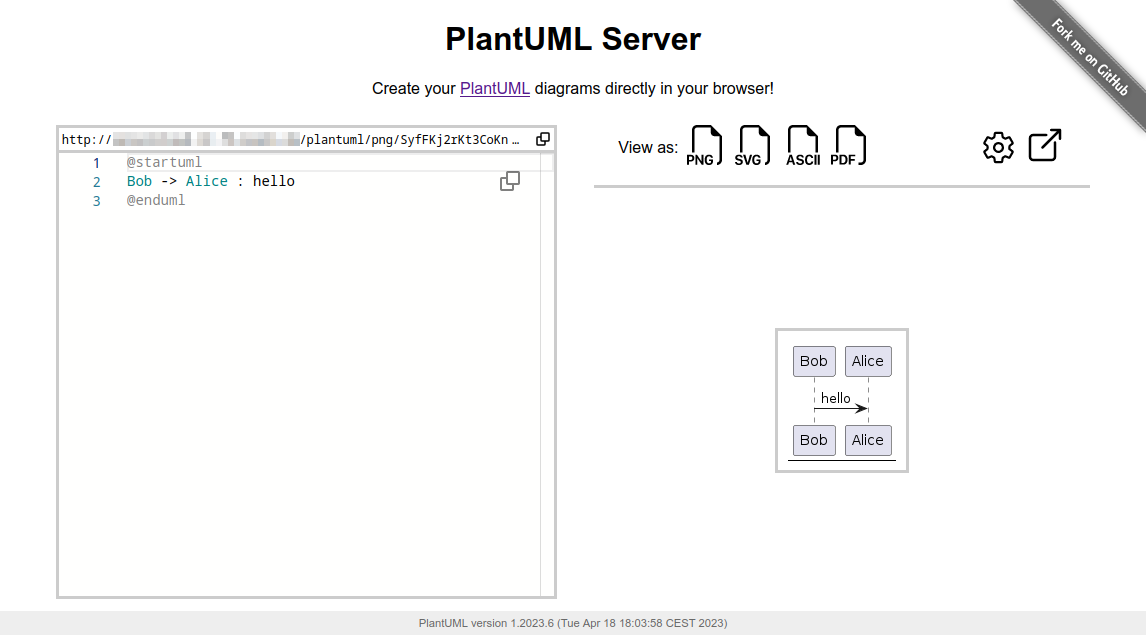
More examples and features about the Web UI can be found in docs/WebUI.
To know more about PlantUML, please visit https://plantuml.com.
Requirements
- jre/jdk 11 or above
- apache maven 3.0.2 or above
Recommendations
- Jetty 11 or above
- Tomcat 10 or above
How to run the server
Just run:
mvn jetty:run
The server is now listening to http://localhost:8080/plantuml. In this way the server is run on an embedded jetty server.
You can specify the port at which it runs:
mvn jetty:run -Djetty.http.port=9999
How to run the server with Docker
You can run Plantuml with jetty or tomcat container
docker run -d -p 8080:8080 plantuml/plantuml-server:jetty
docker run -d -p 8080:8080 plantuml/plantuml-server:tomcat
The server is now listening to http://localhost:8080.
Read-only container
The jetty container supports read-only files system, you can run the read-only mode with:
docker run -d -p 8080:8080 --read-only -v /tmp/jetty plantuml/plantuml-server:jetty
This makes the container compatible with more restricted environment such as OpenShift, just make sure you mount a volume (can be ephemeral) on /tmp/jetty.
Change base URL
To run plantuml using different base url, change the docker-compose.yml file:
environment:
  - BASE_URL=plantuml
And run docker-compose up. This will start a modified version of the image using the base url /plantuml, e.g. http://localhost:8080/plantuml
How to set PlantUML options
You can apply some option to your PlantUML server with environment variable.
If you're using the jetty Maven plugin, use the -D` flag to pass environment variables:
mvn jetty:run -D THE_ENV_VARIABLE=THE_ENV_VALUE -Djetty.http.port=9999
If you use docker, you can use the -e flag:
docker run -d -p 9999:8080 -e THE_ENV_VARIABLE=THE_ENV_VALUE plantuml/plantuml-server:jetty
You can set all the following variables:
BASE_URL- PlantUML Base URL path
- Default value:
ROOT
PLANTUML_SECURITY_PROFILE- Set PlantUML security profile. See PlantUML security.
- If you need more access to e.g. other ports than 80 (http) and 443 (https) or even access to local files, please consider using one of the allowlist features:
plantuml.allowlist.pathplantuml.include.pathplantuml.allowlist.url
- It is strongly advised not to set the
PLANTUML_SECURITY_PROFILEbelowINTERNET! - Default value:
INTERNET
PLANTUML_PROPERTY_FILE- Set PlantUML system properties (like over the Java command line using the
-Dpropertyname=valuesyntax). - To see what kind of file content is supported, see the documentation of
java.util.Properties.load. - Default value:
null
- Set PlantUML system properties (like over the Java command line using the
PLANTUML_CONFIG_FILE- Local path to a PlantUML configuration file (identical to the
-configflag on the CLI) - File content will be added before each PlantUML diagram code.
- Default value:
null
- Local path to a PlantUML configuration file (identical to the
PLANTUML_LIMIT_SIZE- Limits image width and height
- Default value:
4096
PLANTUML_STATS- Set it to
onto enable statistics report - Default value:
off
- Set it to
HTTP_AUTHORIZATION- when calling the
proxyendpoint, the value ofHTTP_AUTHORIZATIONwill be used to set the HTTP Authorization header - Default value:
null
- when calling the
HTTP_PROXY_READ_TIMEOUT- when calling the
proxyendpoint, the value ofHTTP_PROXY_READ_TIMEOUTwill be the connection read timeout in milliseconds - Default value:
10000(10 seconds)
- when calling the
PLANTUML_SAVE_DIR- Local directory used by the save/load API for storing diagrams.
- Default value:
data/saves
PLANTUML_SAVE_MAX_SIZE- Maximum payload size (in bytes) accepted by the save endpoint.
- Default value:
200000
PLANTUML_SAVE_TOKEN- Optional shared token to protect the save/load/delete endpoints. If set, requests must provide the header
X-PlantUML-Token. - Default value:
null(no auth)
- Optional shared token to protect the save/load/delete endpoints. If set, requests must provide the header
Save / Load API
The UI exposes “Save” and “Load” buttons to persist PlantUML sources on the server.
- Endpoints (JSON):
POST /api/diagramswith{ "id": "my-diagram", "name": "optional name", "uml": "@startuml..." }GET /api/diagrams/{id}returns the stored diagramGET /api/diagramsreturns a lightweight list of stored diagramsDELETE /api/diagrams/{id}deletes a stored diagram
- Storage:
- Files are written to
PLANTUML_SAVE_DIR(defaultdata/saves). You can structure ids with folders, e.g.teamA/sequence1. - Max payload is limited by
PLANTUML_SAVE_MAX_SIZE(default 200 KB). - Optional protection: set
PLANTUML_SAVE_TOKENand passX-PlantUML-Tokenheader when calling the API.
- Files are written to
When hosting publicly, enable a token (or protect via reverse proxy) so user saves are not world-writeable.
Alternate: How to build your docker image
This method uses maven to run the application. That requires internet connectivity. So, you can use following command to create a self-contained docker image that will "just work".
docker image build -f Dockerfile.jetty -t plantuml-server:local .
docker run -d -p 8080:8080 plantuml-server:local
The server is now listening to http://localhost:8080.
You may specify the port in -p Docker command line argument.
How to generate the war
To build the war, just run:
mvn package
at the root directory of the project to produce plantuml.war in the target/ directory.
NOTE: If you want that the generated war includes the apache-jsp artifact run:
mvn package -Dapache-jsp.scope=compile
If you want to generate the war with java 8 as target just remove the src/test directory and use pom.jdk8.xml.
rm -rf src/test
mvn package -f pom.jdk8.xml [-Dapache-jsp.scope=compile]
Use with reverse-proxy
It is possible to use PlantUML with a reverse proxy.
You can find this and other examples here.